
If you have spent any time inside Microsoft’s Power Platform this year, you have probably encountered a version of this question: ‘Should we be using Copilot Studio or Power Automate for this?’ The confusion is understandable. Both live inside the same Microsoft ecosystem. Both involve automation. Both are being promoted heavily as essential tools for Vision 2030-aligned digital transformation.
But they are not the same tool, and choosing the wrong one for a given problem wastes money, creates technical debt, and frustrates employees. This guide cuts through the overlap and gives Saudi IT teams the decision framework they actually need.
| Microsoft 365 Copilot global enterprise adoption 90%+ Of Fortune 500 companies deployed Microsoft Copilot to their workforce in 2026 — Qiddiya Investment Company and ACWA Power among confirmed Saudi adopters |
First: What Each Tool Actually Does
Microsoft Power Automate; the workflow engine
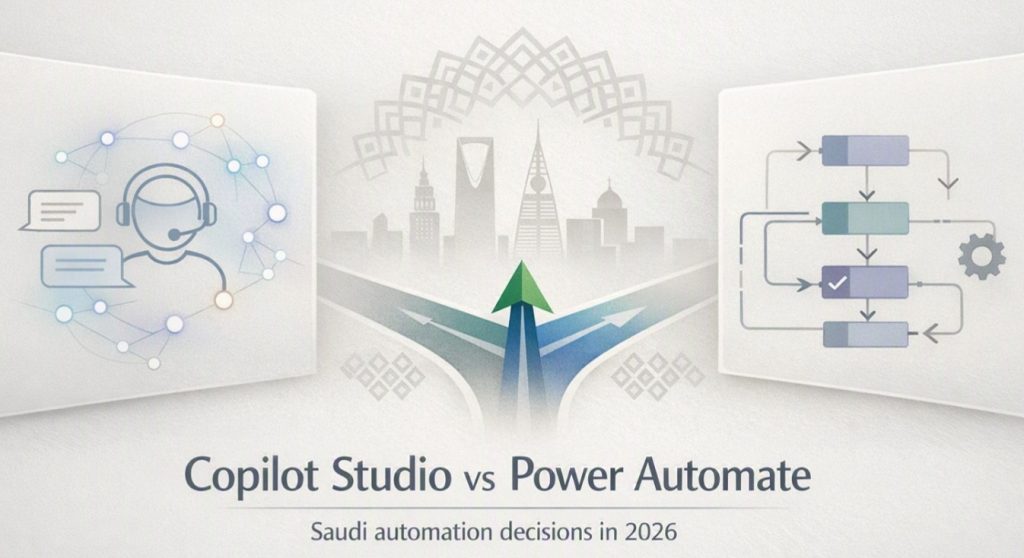
Power Automate is Microsoft’s trigger-based workflow automation platform. It builds flows that respond to events; a form submission, a new email, a scheduled time and execute a defined sequence of steps across connected systems. Think of it as the back-end engine: invisible to the end user, running reliably in the background, processing high volumes of structured data.
Power Automate offers more than 1,400 prebuilt certified connectors to Microsoft and third-party systems including SAP, Salesforce, Dynamics 365, SharePoint, and Oracle. It supports Cloud flows, desktop flows for RPA (Robotic Process Automation), and AI Builder capabilities for document processing and form recognition.
Microsoft Copilot Studio; the AI agent builder
Copilot Studio is Microsoft’s low-code platform for building custom AI agents. Instead of responding to system triggers, Copilot Studio agents respond to natural language, understanding user intent, reasoning through context, and taking action. The result is a conversational AI layer that your employees or customers interact with, built on the same generative AI foundation as Microsoft 365 Copilot.
Crucially, Copilot Studio agents can call Power Automate flows as part of their actions. A user asks the HR agent ‘What is my leave balance?’ — the agent understands the request, triggers a Power Automate flow to query the HR system, and returns the result in conversational language.
The Core Architectural Difference
This is the single most important distinction to understand before any procurement decision:
| Dimension | Power Automate | Copilot Studio |
| Core purpose | Workflow automation | Conversational AI agent platform |
| How it starts | Triggered by events or schedules | Started by natural language from a user |
| Behavior | Deterministic — follows defined logic | Adaptive — reasons and plans autonomously |
| User interaction | None — runs in background | Direct — user talks to the agent |
| Best for | Structured, repetitive, high-volume | Dynamic, context-dependent, user-facing |
| AI role | AI Builder for specific tasks (OCR etc) | Generative AI is the foundation |
| Complexity ceiling | Complex logic with loops and branching | Complex conversations and goal-oriented tasks |
Pricing Reality: What Saudi Organizations Actually Pay
This is where many GCC IT teams get surprised. The licensing model for each tool is fundamentally different and the real cost of Copilot Studio in particular is often underestimated at budget stage.
Power Automate Pricing (June 2026):
- Premium per-user: USD $15/user/month (approximately SAR 56/user/month) — includes cloud flows with premium connectors.
- Premium per-flow: USD $500/month for 5 flows (approximately SAR 1,875/month) — best for high-volume automations with multiple users.
- Desktop flows (RPA): Requires the premium plan — for automating legacy desktop systems and non-API applications
- Included in M365 plans: Standard connectors (SharePoint, Teams, Outlook) are included with Microsoft 365 subscriptions at no additional cost.
Copilot Studio pricing (June 2026):
- Included with M365 Copilot licenses: Internal agent building and usage are included at no extra cost for M365 Copilot licensed users, this covers employee-facing agents within the Microsoft 365 environment.
- Standalone Copilot Studio (external agents): USD $200/month per tenant for 25,000 Copilot Credits, required for customer-facing agents deployed to websites, apps, or external channels (approximately SAR 750/month per tenant).
- Pay-as-you-go: USD $0.01 per credit via Azure, no upfront commitment, ideal for pilots and variable usage.
- Critical note: M365 Copilot licenses (required as the base) cost USD $18–$30/user/month additionally. A 100-user deployment costs approximately USD $6,600/month (SAR 24,750/month) before a single agent is built.
- Autonomous triggers: Always cost Copilot Credits, even for M365 Copilot licensed users. Every time an agent acts without a user prompt, 25 credits are consumed. Budget accordingly.
The Saudi Arabia Context; Why This Decision Matters More in 2026
Microsoft’s confirmation of the Saudi Arabia East datacenter region opening in Q4 2026 is a direct signal to every Saudi and GCC organization: the time to plan your Power Platform strategy is now, not after the region goes live. Data residency, a mandatory consideration under NDMO classification standards and PDPL will be natively addressed for organizations running workloads in the Saudi Azure region.
Two Saudi organizations already demonstrate what the combined Power Platform approach looks like at scale. Qiddiya Investment Company has scaled Microsoft 365 Copilot adoption to summarize communications, generate content, and analyze project data across Outlook, Word, Excel, and Power BI, querying terabytes of project data across 700+ contractors in seconds. ACWA Power is expanding generative AI use cases including contract analysis and RFP generation, building toward broader Microsoft 365 Copilot adoption on its Azure-powered platform.
Five Decision Scenarios: Which Tool to Choose
Scenario 1 — You want to automate invoice approval routing across 500 vendors
Use Power Automate. This is a structured, high-volume, deterministic workflow with clear logic. Power Automate handles the triggers, conditions, error handling, and parallel branching that complex approval chains require. No conversational layer is needed.
Scenario 2 — You want employees to ask HR policy questions in plain Arabic
Use Copilot Studio. Connect the agent to your HR knowledge base in SharePoint. Employees ask questions naturally in Teams — the agent retrieves the relevant policy, summarizes it conversationally, and escalates to a Power Automate flow if a formal request needs to be logged.
Scenario 3 — You want to process 10,000 supplier invoices overnight
Use Power Automate with AI Builder. Scheduled flows with AI Builder document processing extract data from invoices, validate against SAP records, and route exceptions for human review. Volume and speed are the priorities, not conversation.
Scenario 4 — You want a customer-facing chatbot on your Saudi ecommerce site
Use Copilot Studio with standalone licensing. External-facing agents require standalone Copilot Studio capacity. Build the agent to handle order status, returns, and product queries, triggering Power Automate flows to fetch real-time data from your systems when needed.
Scenario 5 — You want both conversational access and structured backend automation
Use both — this is the most common enterprise pattern. Copilot Studio is the front-end conversational layer. Power Automate is the back-end execution engine. An employee asks the agent to ‘Request access to the procurement system’, Copilot Studio gathers context, Power Automate creates the request, routes it for approval, provisions access and notifies the employee.
| Use case | Right tool | Reasoning |
| Invoice routing (high volume) | Power Automate | Structured, deterministic, no user interaction |
| HR FAQ chatbot (Arabic) | Copilot Studio | Natural language, conversational, user-facing |
| Document data extraction (OCR) | Power Automate + AI Builder | Volume processing, not conversational |
| Customer support agent (web) | Copilot Studio standalone | External channel requires standalone license |
| Approval workflow + AI chat | Both together | Copilot front-end + Power Automate back-end |
| NCA compliance reporting | Power Automate | Structured, scheduled, audit-trail required |
Common Mistakes Saudi IT Teams Make
- Buying Copilot Studio Standalone before assessing M365 Copilot: If your team already has M365 Copilot licenses, internal agents are already included. Buying standalone capacity before exhausting included usage is wasted spend.
- Using Copilot Studio for high-volume background automation: Copilot Credits billed per agent action make it expensive for 10,000+ invoice flows. Power Automate’s per-flow pricing is significantly cheaper at volume
- Ignoring Dataverse dependency: Enterprise features in both tools — agent memory, advanced routing, complex data operations — require Microsoft Dataverse. Not all M365 plans include it. Verify before designing architecture.
- Treating autonomous triggers as free: Every autonomous agent trigger costs 25 Copilot Credits — even for M365 Copilot licensed users. High-frequency autonomous agents can exhaust credit packs quickly.
- Microsoft official comparison: Power Platform pricing and licensing guide
- Free learning resource: Microsoft Learn — Power Automate fundamentals
- Free learning resource: Microsoft Learn — Copilot Studio fundamentals
- KSA Microsoft partner network: Find a certified Microsoft partner in Saudi Arabia
Quick-start: Start this week by answering three questions about your highest-priority automation use case: (1) Does a user need to interact with this process in natural language? (2) Is this workflow structured with predictable steps, or does it require adaptive reasoning? (3) Is this internal-employee-facing or customer-facing? Those three answers will tell you exactly which tool — or which combination — is right. Then visit Microsoft Learn to complete the free Power Automate or Copilot Studio fundamentals path before booking a demo with a certified Saudi Microsoft partner.
The Vision 2030 Frame: Getting the Foundations Right
Saudi Arabia’s digital transformation ambitions under Vision 2030 depend on organizations making smart, sustainable technology choices — not just buying the newest tool. Microsoft’s Power Platform, used correctly, is one of the most powerful productivity ecosystems available to Saudi businesses today.
Power Automate handles the structured, high-volume, governed automation that keeps operations running. Copilot Studio delivers the intelligent, conversational layer that makes those operations accessible in plain language. Together, they form a complete automation stack that aligns with Vision 2030’s workforce productivity and digital government goals.
The organizations that will lead in the Kingdom’s digital decade are not those that buy every Microsoft tool at once. They are those that understand what each tool does, deploy them with intention, and measure the return on every Riyal invested in automation.
References & Sources
All statistics, GCC-specific data, and organizational examples cited in this article are sourced from verified, publicly accessible reports, official announcements, and peer-reviewed industry research.